# La page plan de formation

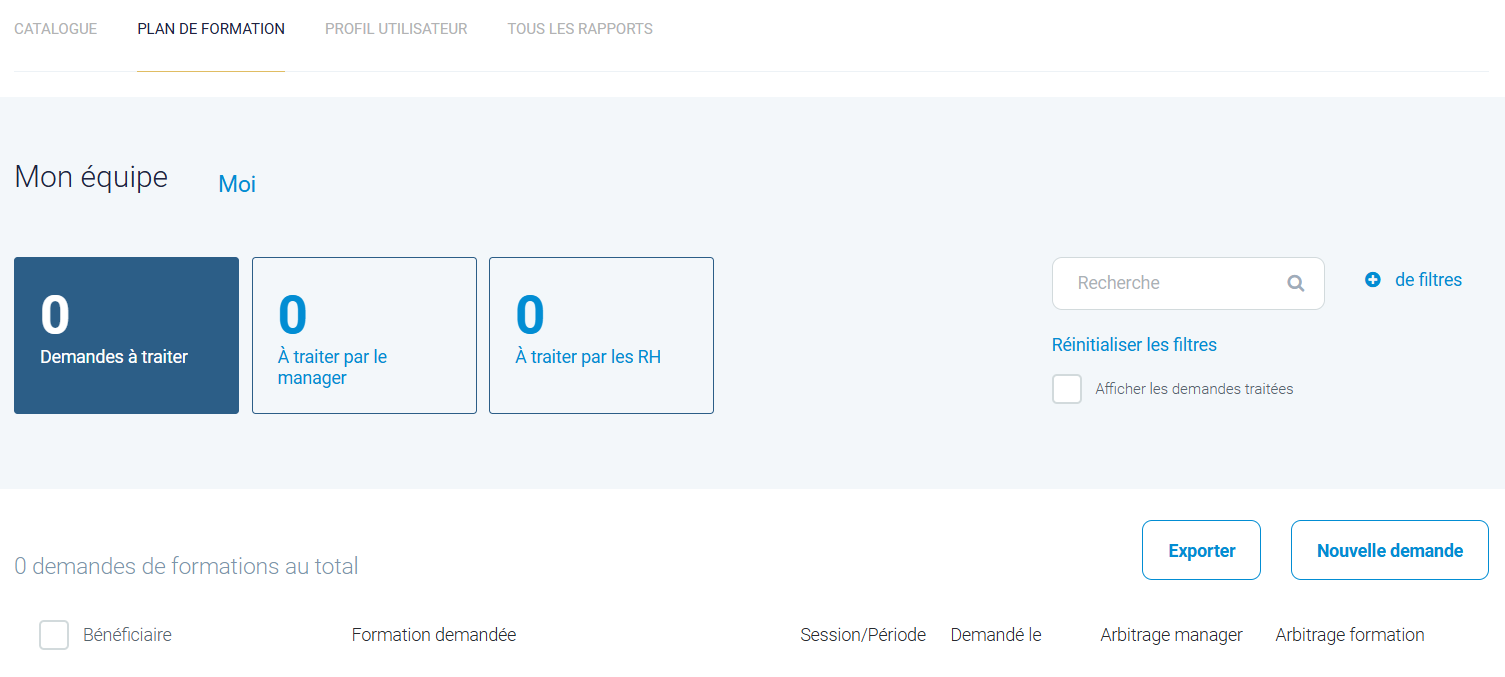
Cela permet d'afficher un plan de formation comme une page du site et non comme un plan de formation dans le catalogue.

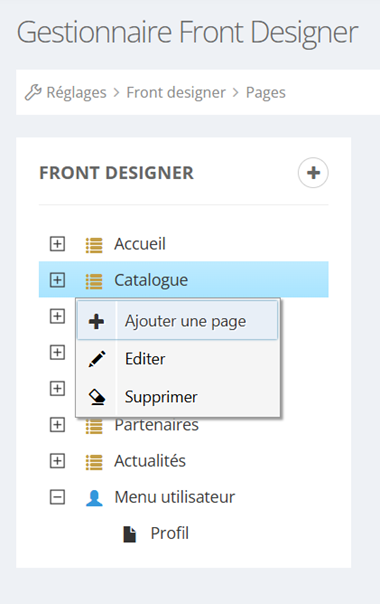
<table border="1" id="bkmrk-au-niveau-de-l%27ongle" style="border-collapse: collapse; width: 100%;"><colgroup><col style="width: 19.2718%;"></col><col style="width: 80.6838%;"></col></colgroup><tbody><tr><td>Au niveau de l'onglet Réglages, Front Designer, Pages, après avoir sélectionné la section où l'on souhaite ajouter cette page, on clique doit sur la souris et "ajouter une page".

</td><td>![](https://documentation.xperteam.net/uploads/images/gallery/2025-07/embedded-image-ihniwnfz.png)</td></tr></tbody></table>

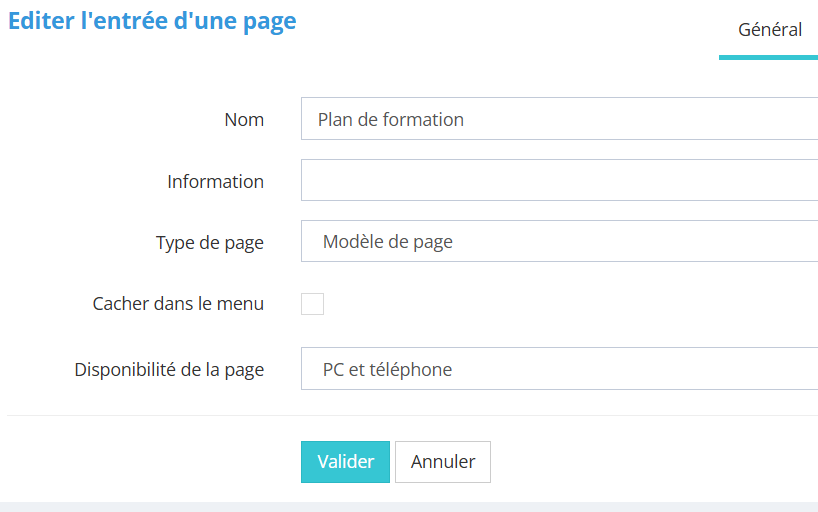
<table border="1" id="bkmrk-dans-l%27onglet-g%C3%A9n%C3%A9ra" style="font-family: -apple-system, BlinkMacSystemFont, 'Segoe UI', Oxygen, Ubuntu, Roboto, Cantarell, 'Fira Sans', 'Droid Sans', 'Helvetica Neue', sans-serif; font-size: 14px; width: 100%;"><colgroup><col style="width: 20.1394%;"></col><col style="width: 79.8162%;"></col></colgroup><tbody><tr><td>Dans l'onglet général, on choisit le nom et on sélectionne le "modèle de page" .</td><td>[![image.png](https://documentation.xperteam.net/uploads/images/gallery/2025-07/scaled-1680-/lBwimage.png)](https://documentation.xperteam.net/uploads/images/gallery/2025-07/lBwimage.png)

</td></tr></tbody></table>

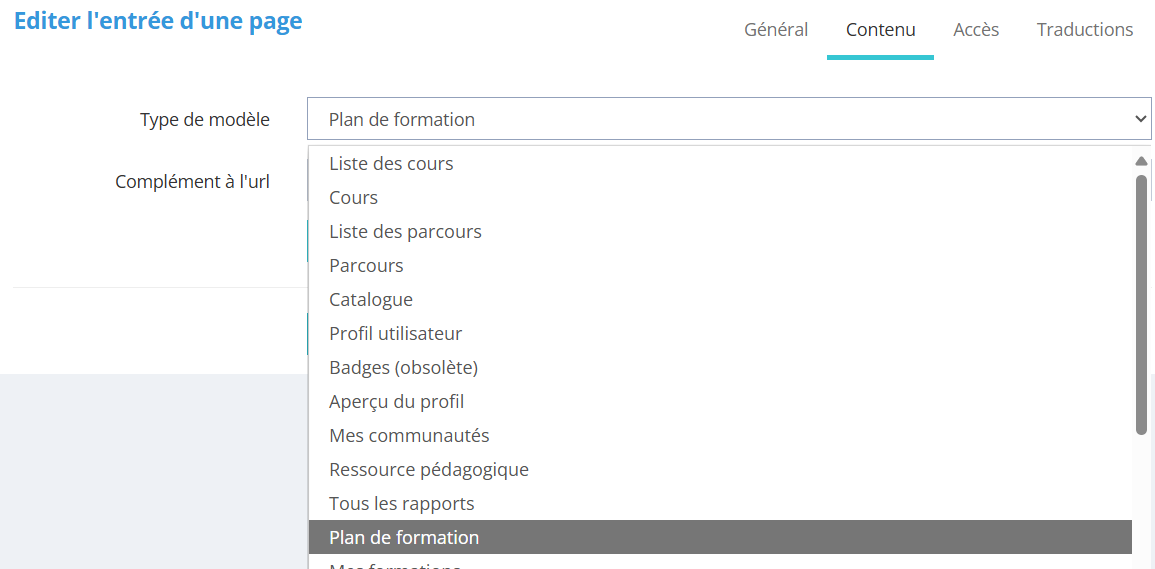
<table border="1" id="bkmrk-dans-l%27onglet-conten" style="border-collapse: collapse; width: 100%;"><colgroup><col style="width: 21.6445%;"></col><col style="width: 78.4346%;"></col></colgroup><tbody><tr><td>Dans l'onglet contenu, on choisit parmi la liste le type de modèle "<span style="mso-spacerun: yes;"> Plan de formation</span>" et on clique sur valider.

</td><td>[![Capture d'écran 2025-07-08 155911.png](https://documentation.xperteam.net/uploads/images/gallery/2025-07/scaled-1680-/capture-decran-2025-07-08-155911.png)](https://documentation.xperteam.net/uploads/images/gallery/2025-07/capture-decran-2025-07-08-155911.png)

</td></tr></tbody></table>

<table border="1" id="bkmrk-" style="border-collapse: collapse; width: 100%;"><colgroup><col style="width: 99.8765%;"></col></colgroup><tbody><tr><td>[![image.png](https://documentation.xperteam.net/uploads/images/gallery/2025-07/scaled-1680-/9hoimage.png)](https://documentation.xperteam.net/uploads/images/gallery/2025-07/9hoimage.png)

</td></tr></tbody></table>