# L'Assistant Fusion utilisateur

L'Assistant Fusion vous permet de fusionner deux utilisateurs en conservant les meilleures statistiques de chacun.

### <span style="color: rgb(128, 128, 128);">**Distinction des utilisateurs à fusionner**</span>

<span style="color: rgb(0, 0, 0);">Dans un premier temps, nous vous recommandons de vous rendre sur la fiche utilisateurs des deux comptes à fusionner et de repérer un caractère distinctif afin de bien définir quel compte sera à conserver, et quel compte devra être supprimé.</span>

<span style="color: rgb(0, 0, 0);">Ce caractère distinctif peut être son patronyme, son adresse email, son identifiant externe unique, un champ personnalisé.</span>

<p class="callout success"><span style="color: rgb(0, 0, 0);">Dans cette fiche, nous nommerons :  
- **User A** l'utilisateur à garder ;  
- **User Z** l'utilisateur à supprimer.  
</span></p>

### <span style="color: rgb(128, 128, 128);">**Principe de l'Assistant Fusion**</span>

<span style="color: rgb(128, 128, 128);"><span style="color: rgb(0, 0, 0);">En théorie, si la fusion est faite correctement, les <span style="color: rgb(239, 131, 29);">**données liées aux cours et parcours**</span> de l’utilisateur à supprimer *(<span style="color: rgb(239, 131, 29);">User Z</span>)* <span style="color: rgb(239, 131, 29);">**apparaitront dans les statistiques de l’utilisateur à conserver**</span> *(<span style="color: rgb(239, 131, 29);">User A</span>)*. </span></span>

<span style="color: rgb(128, 128, 128);"><span style="color: rgb(0, 0, 0);">Si un même cours a été réalisé par les deux utilisateurs, ce sont <span style="color: rgb(239, 131, 29);">**les meilleurs résultats**</span> qui seront conservés.</span>  
</span>

<p class="callout info"><span style="color: rgb(128, 128, 128);"><span style="color: rgb(0, 0, 0);">Nous vous recommandons tout de même de faire une **sauvegarde des données** de chaque utilisateur.   
Pour ce faire, vous pouvez éditer un **rapport détaillé 0303 ou 0304** pour chacun d'eux. Dans le paramétrage du rapport, sélectionnez l'utilisateur dans l'onglet « Critères » afin de générer des rapports moins lourds et plus facilement exploitables.</span></span></p>

### **<span style="color: rgb(128, 128, 128);">Fusion des comptes</span>**

#### <span style="color: rgb(0, 0, 0);">**Sélection de l'utilisateur à supprimer**</span>

Dans le menu <span style="color: rgb(239, 131, 29);">**Assistants &gt; Assistant fusion** <span style="color: rgb(0, 0, 0);">:</span></span>

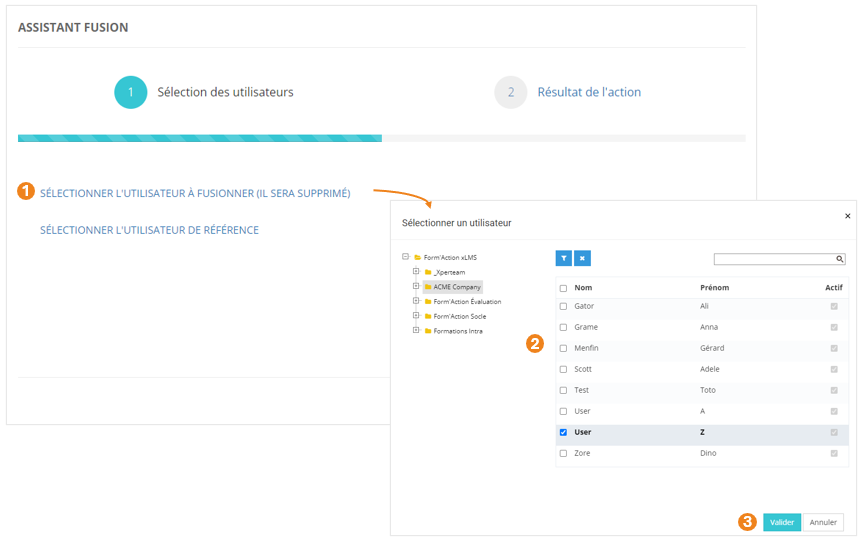
1. <span style="color: rgb(0, 0, 0);">Cliquez sur <span style="color: rgb(239, 131, 29);">**SÉLECTIONNER L'UTILISATEUR À FUSIONNER (IL SERA SUPPRIMÉ)**</span> ;</span>
2. <span style="color: rgb(0, 0, 0);">Dans la pop-up qui s'ouvre, sélectionnez l'**<span style="color: rgb(239, 131, 29);">utilisateur</span>** (ici, *<span style="color: rgb(239, 131, 29);">User Z</span>*) ;</span>
3. <span style="color: rgb(0, 0, 0);">Cliquez sur <span style="color: rgb(239, 131, 29);">**Valider**<span style="color: rgb(0, 0, 0);"> ;</span></span></span>
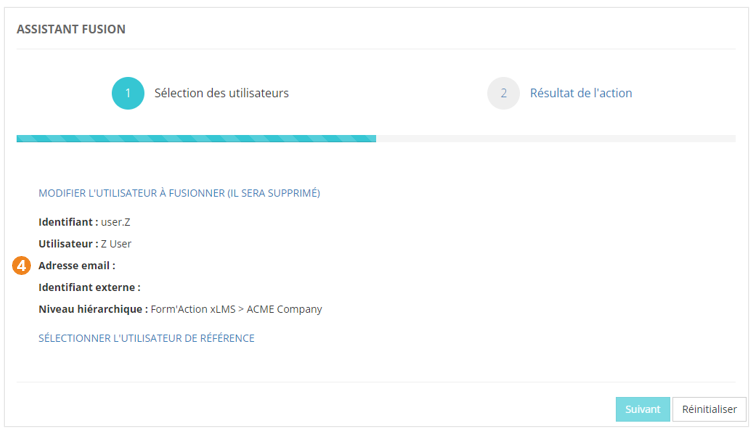
4. <span style="color: rgb(0, 0, 0);">De retour sur l'écran principal, vous obtenez un **<span style="color: rgb(239, 131, 29);">récapitulatif des **i**nformations</span>** sur l'utilisateur à supprimer.</span> <span class="callout info"><span style="color: rgb(0, 0, 0);">À ce stade, vous pouvez modifier l'utilisateur sélectionné en cas d'erreur.</span></span>

[![image.png](https://documentation.xperteam.net/uploads/images/gallery/2024-06/scaled-1680-/NWzimage.png)](https://documentation.xperteam.net/uploads/images/gallery/2024-06/NWzimage.png)

[![image.png](https://documentation.xperteam.net/uploads/images/gallery/2024-06/scaled-1680-/2Jlimage.png)](https://documentation.xperteam.net/uploads/images/gallery/2024-06/2Jlimage.png)
#### <span style="color: rgb(0, 0, 0);">**Sélection de l'utilisateur à conserver**</span>

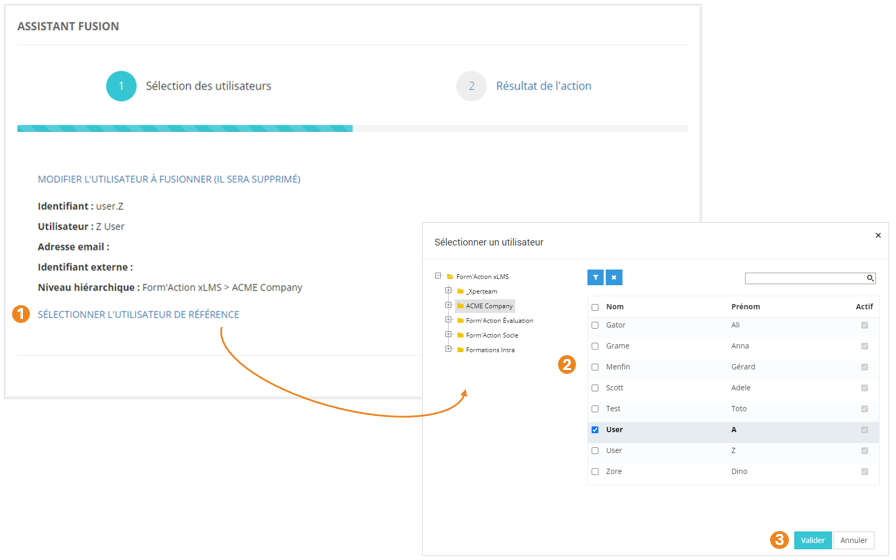
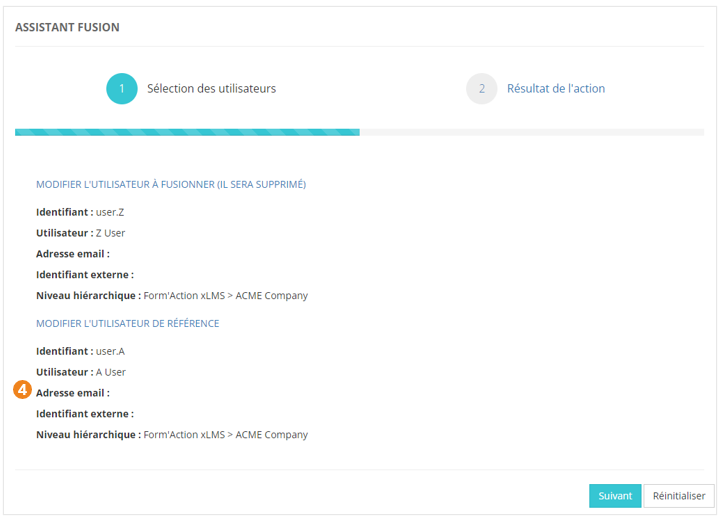
1. <span style="color: rgb(0, 0, 0);">Cliquez sur <span style="color: rgb(239, 131, 29);">**SÉLECTIONNER L'UTILISATEUR DE RÉFÉRENCE**</span> ;</span>
2. <span style="color: rgb(0, 0, 0);">Dans la pop-up qui s'ouvre, sélectionnez l'**<span style="color: rgb(239, 131, 29);">utilisateur</span>** (ici, *<span style="color: rgb(239, 131, 29);">User A</span>*) ;</span>
3. <span style="color: rgb(0, 0, 0);">Cliquez sur <span style="color: rgb(239, 131, 29);">**Valider** <span style="color: rgb(0, 0, 0);">;</span></span></span>
4. <span style="color: rgb(0, 0, 0);">De retour sur l'écran principal, vous obtenez un **<span style="color: rgb(239, 131, 29);">récapitulatif des **i**nformations</span>** sur l'utilisateur à conserver.</span> <span class="callout info"><span style="color: rgb(0, 0, 0);">À ce stade, vous pouvez modifier chacun des utilisateurs sélectionnés en cas d'erreur.</span></span>

[![image.png](https://documentation.xperteam.net/uploads/images/gallery/2024-06/scaled-1680-/3cdimage.png)](https://documentation.xperteam.net/uploads/images/gallery/2024-06/3cdimage.png)

[![image.png](https://documentation.xperteam.net/uploads/images/gallery/2024-06/scaled-1680-/3VNimage.png)](https://documentation.xperteam.net/uploads/images/gallery/2024-06/3VNimage.png)
#### **Fusion**

Lorsque vous êtes satisfait des utilisateurs sélectionnés :

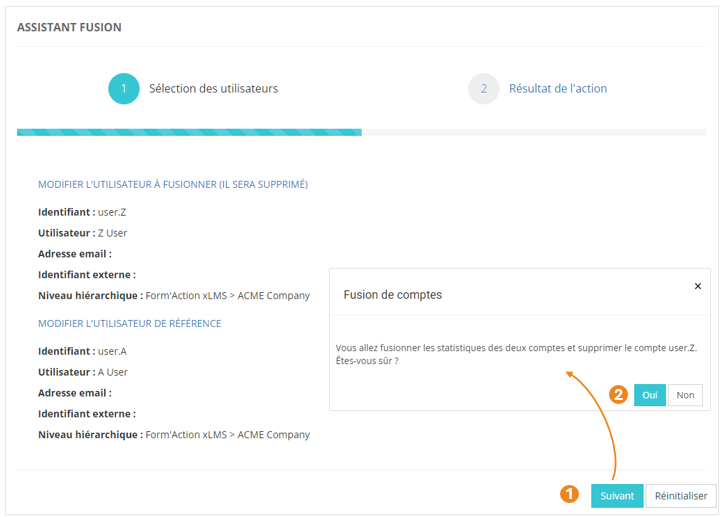
1. Cliquez sur **<span style="color: rgb(239, 131, 29);">Suivant </span>**;
2. Dans la pop-up qui s'ouvre, cliquez sur <span style="color: rgb(239, 131, 29);">**Oui**</span>.

[![image.png](https://documentation.xperteam.net/uploads/images/gallery/2024-06/scaled-1680-/csjimage.png)](https://documentation.xperteam.net/uploads/images/gallery/2024-06/csjimage.png)

#### **Résultat de l'action**
![](https://documentation.xperteam.net/uploads/images/gallery/2024-06/embedded-image-7vejsaam.png)

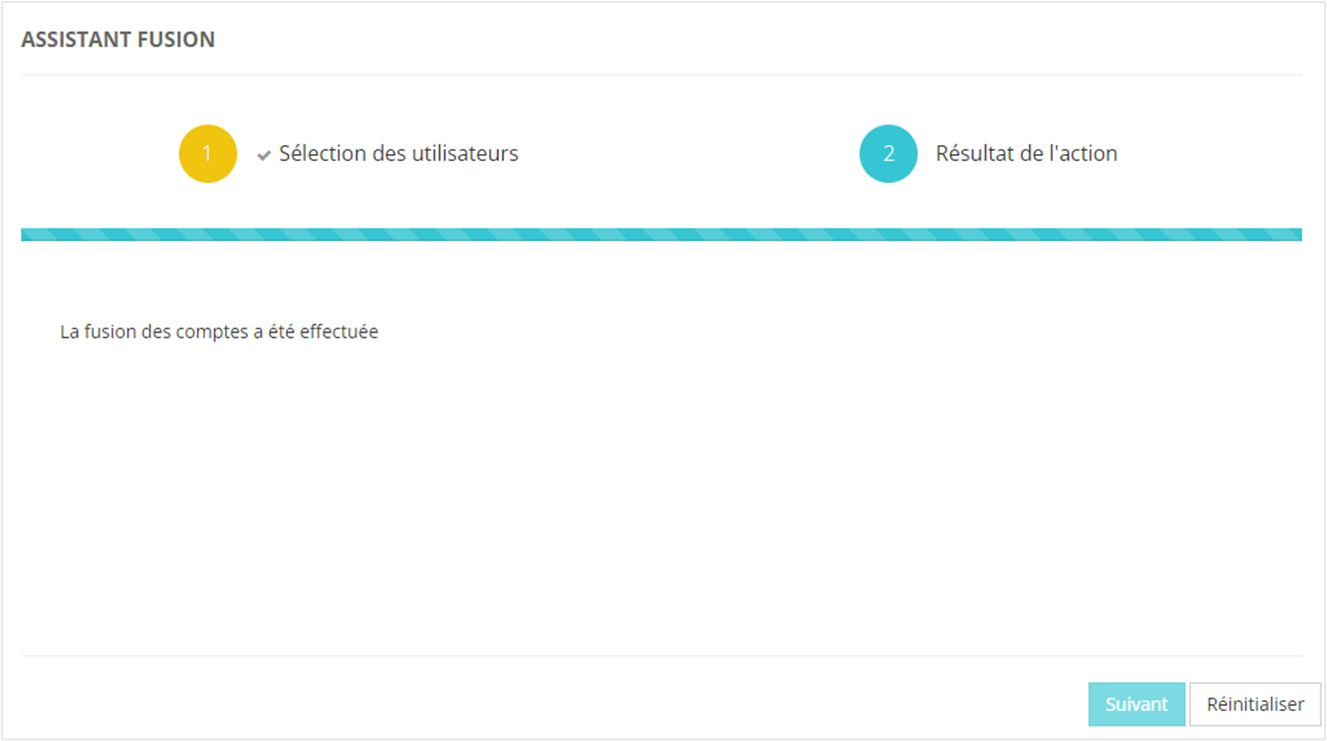
Cet écran vous indique si la fusion a été <span style="color: rgb(239, 131, 29);">**correctement effectuée ou non**</span>.

Le bouton <span style="color: rgb(239, 131, 29);">**Réinitialiser** </span>ramène à l’écran de sélection des utilisateurs de l’assistant, afin de procéder à une nouvelle fusion, via l’assistant.

<p class="callout info">Le bouton **Réinitialiser** n’annule pas la dernière action.</p>